Meeting recorder for your sales team
Sales call recording software that coaches while you sell.
Ricavi records your reps’ sales calls on Google Meet, Microsoft Teams, and Zoom. Unlike an AI note-taker, it also coaches each rep while the buyer talks. Then it drafts the CRM updates for the rep to approve.





What Ricavi does on each sales call.
83%
Less admin
Ricavi writes the call notes, drafts the follow-ups, and updates the CRM once reps approve.
Records sales calls
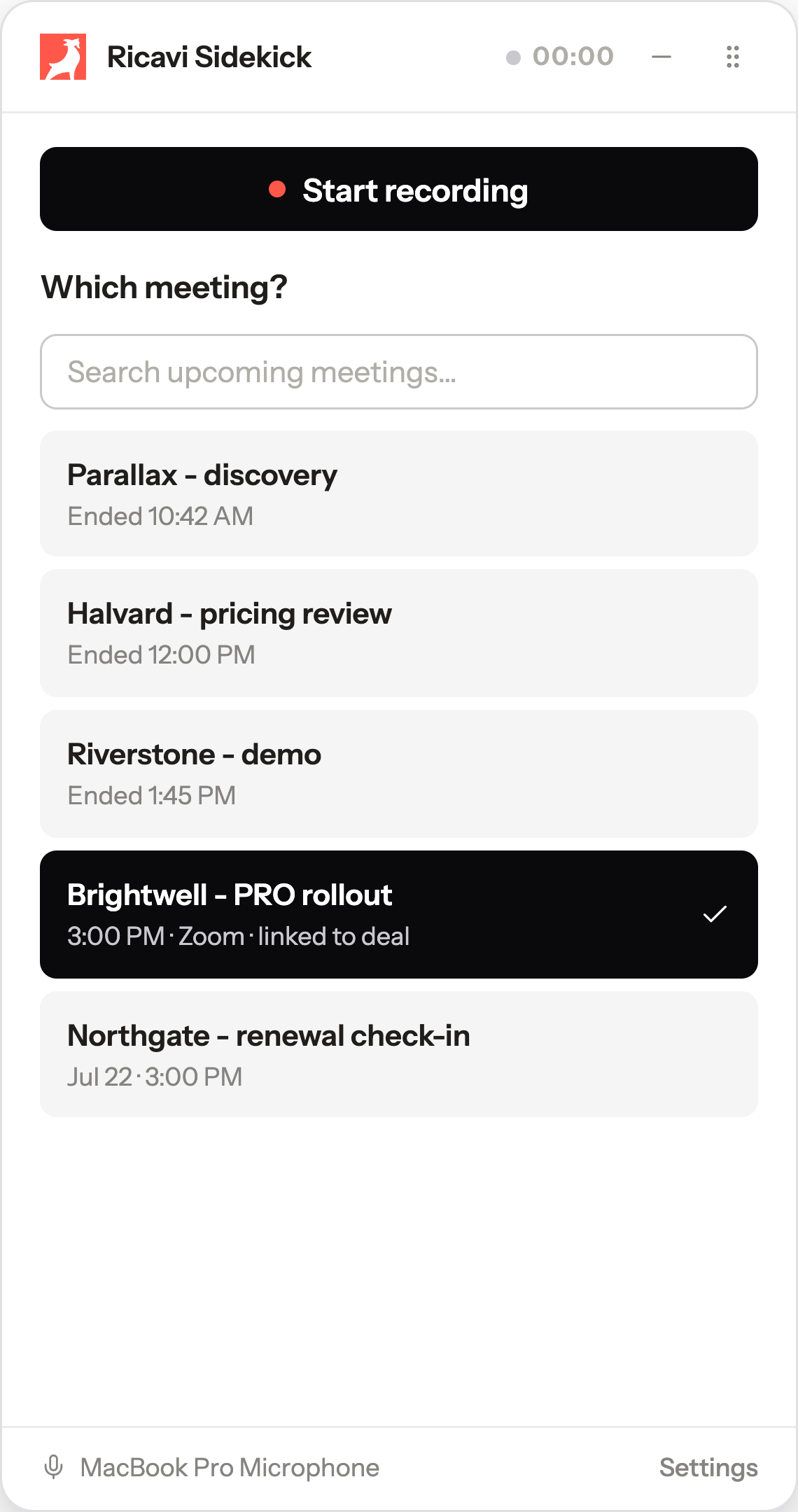
Your rep presses record on Google Meet, Microsoft Teams, or Zoom.
Coaches reps live
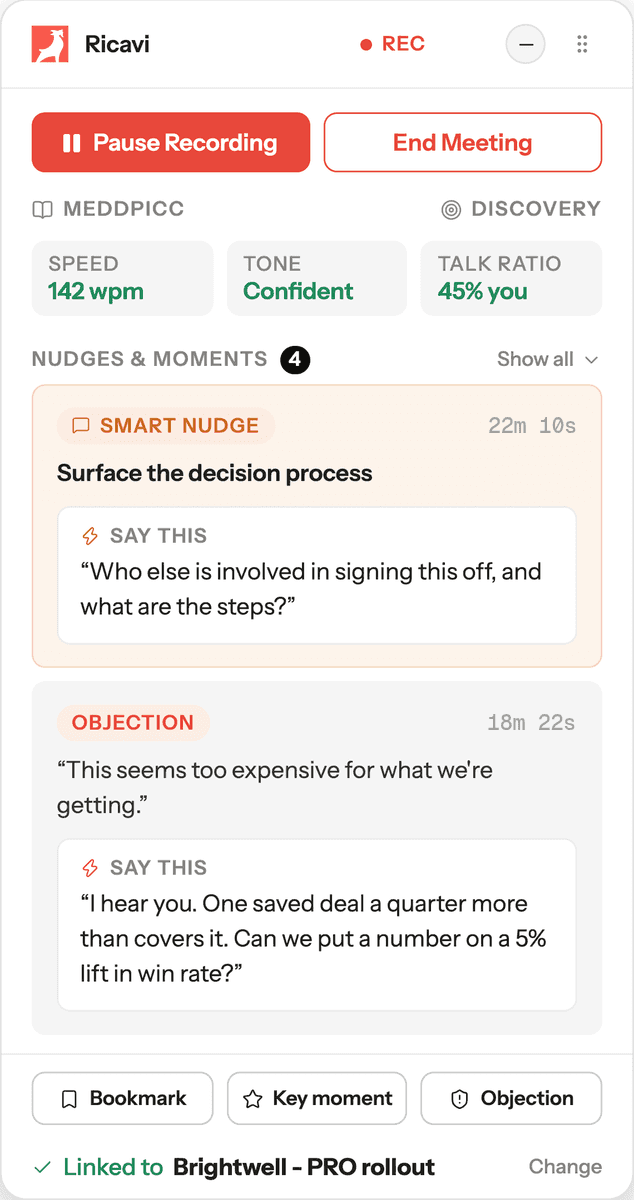
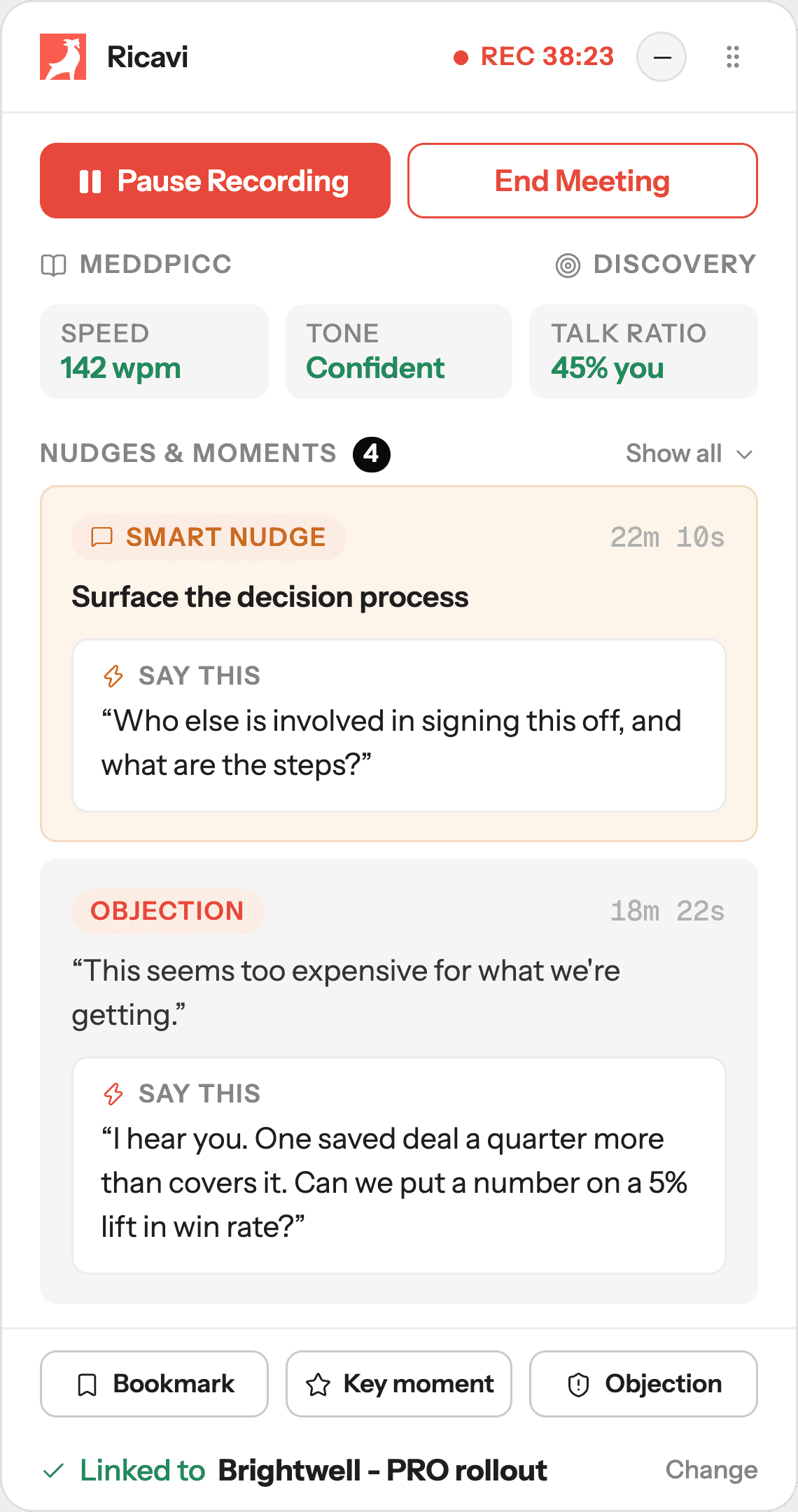
A sidebar only your rep sees shows what to say next.
One page per call
It holds the audio, a transcript, key moments, and a score.
Drafts CRM updates
They sync only after your rep approves them.
Who sees what
Only your rep sees Ricavi.
Your prospect sees a normal call. Your rep sees Ricavi beside it.
During the call
Your prospect sees

That’s the default. Your admin can turn on a named bot that everyone sees.
Nothing changes here
Your rep sees

The same call with Ricavi beside it. Only your rep sees the nudge.
The nudge arrives here only
Recording, transcript, and summary
Your rep and their manager see them. Your admin sets which calls are recorded.
Scorecard
Your rep sees their own. Their manager sees their reports’.
Coaching chats
Private unless your rep shares them. A manager sees shared chats, read-only.
For RevOps
CRM updates drafted from the call, approved one by one.
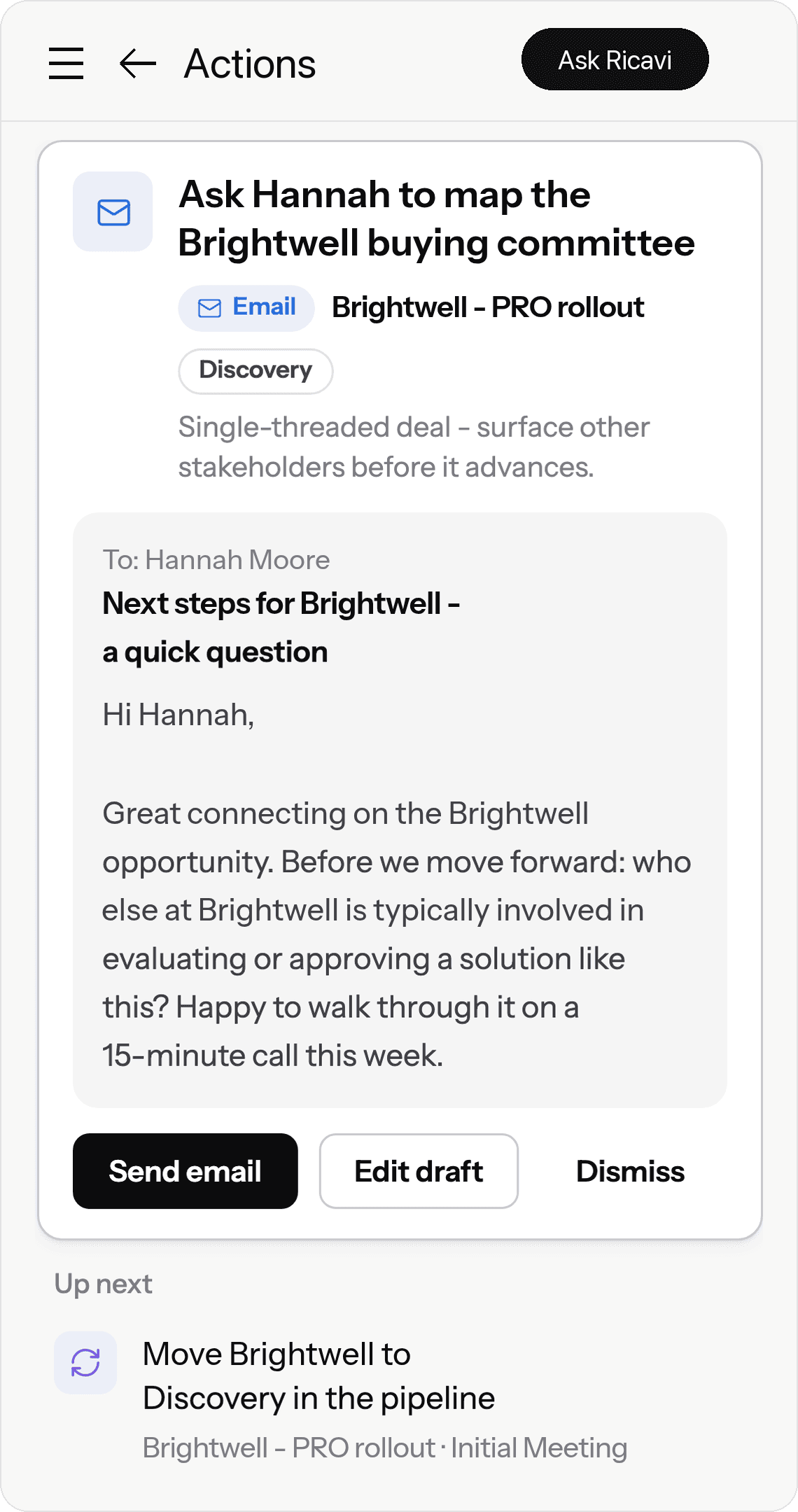
After each call, Ricavi drafts the follow-up, the stage change, and the CRM updates. Each draft waits until the seller edits it, if needed, and approves it. Then it’s sent from their own account.
Before the meeting

After the meeting

Your rep approves each CRM update first.

What Ricavi is
A note-taker tells you what happened. Ricavi coaches your rep live.
An AI note-taker is a tool that records your call and writes a summary when it ends. Ricavi records the same call. It also helps your rep while the buyer is still talking. Here’s one call, recorded by both.

| Moment | An AI note-taker | Ricavi |
|---|---|---|
| 18m 22s: The buyer pushes back on price. | Recording. No help. | A sidebar only your rep sees shows what to say back. Ricavi’s live sidebar at 18m 22s: an objection card. The buyer says “This seems too expensive for what we’re getting.” Say this: “I hear you. One saved deal a quarter more than covers it. Can we put a number on a 5% lift in win rate?” |
| 22m 10s: Nobody has asked who signs off yet. | Recording. No help. | The sidebar gives your rep the question to ask. Ricavi’s live sidebar at 22m 10s: a smart nudge, Surface the decision process. Say this: “Who else is involved in signing this off, and what are the steps?” |
| 42m 18s: The call ends. | A summary of what was said. | A score that names the skill to work on, and a follow-up drafted for your rep to approve. The call’s score in Ricavi: 62 out of 100. The weakest skill is Discover, at 45. |
It records calls and coaches your rep live.
The call page
Everything from the call, on one page.
This is the page your rep opens after the call. The audio sits next to the transcript, key moments, and scorecard. So does a coaching chat that already knows the call.
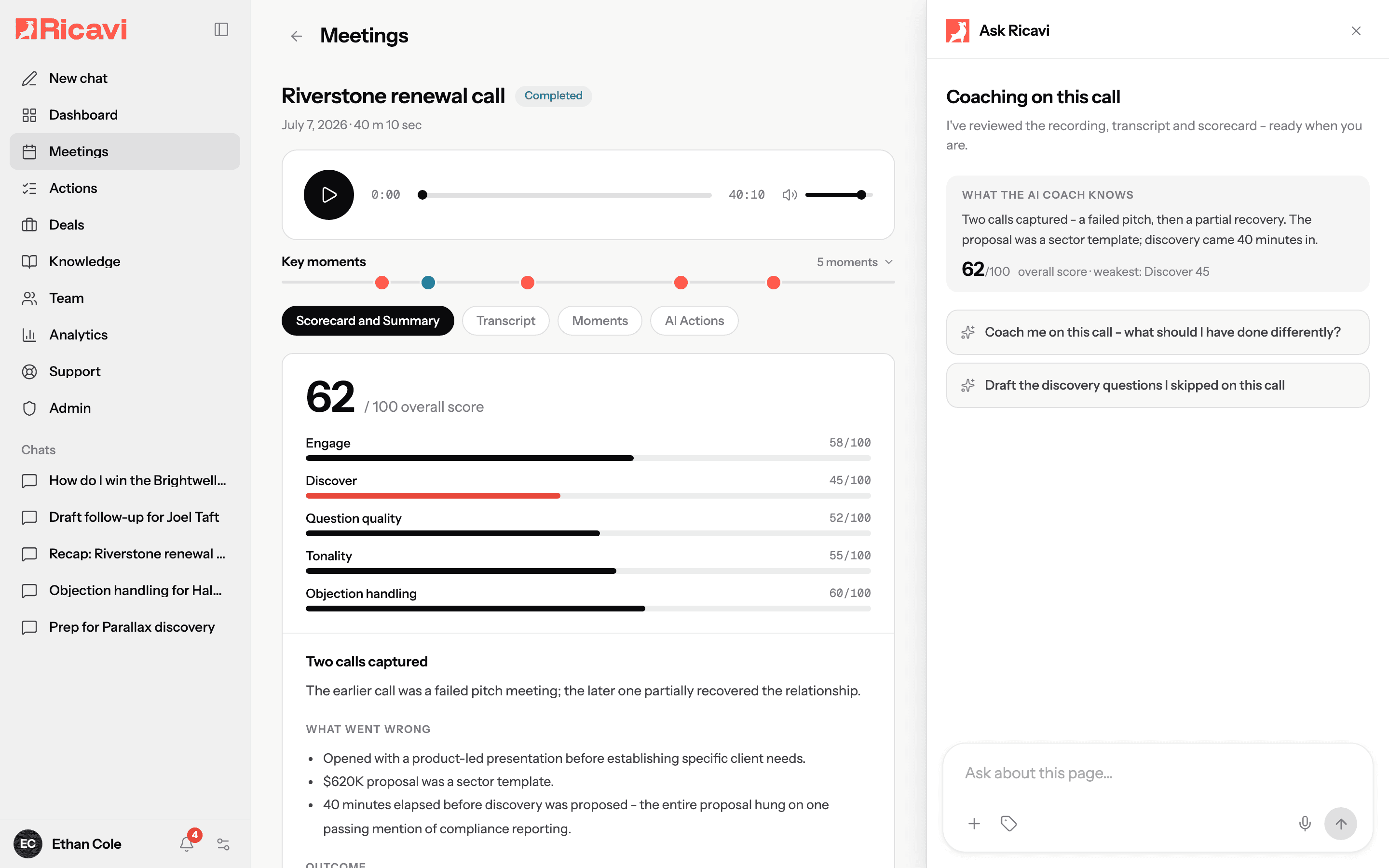
Hear the call
Each call on Google Meet, Microsoft Teams, or Zoom gets a transcript. Play back any moment.
Key moments
Buying signals, price questions, rival names, and risks are flagged on the timeline. Each one shows its time.
Score and notes
Each call is scored against your sales method. Each score links to a moment in the call. The notes sum up the outcome.

A coaching chat that knows the call
Ask what to do differently. It answers from this call’s audio, transcript, and score.
Each call gets one page with everything.
For your admin
Your admin sets the rules once.
Ricavi records only the calls that match.
By default, nobody on the call sees a bot or a notice. Change a rule below and the example day changes with it.
Recording rules
Set by your admin
- External video callsGoogle Meet, Microsoft Teams, Zoom
- Internal callsOnly people from your company
- Domains you excludenorthgate.example
- Kept for the period you setThen purged automatically
Example day
- 09:00Pipeline reviewInternalSkipped: internal call
- 10:30Brightwell demoExternal · brightwell.exampleRecorded · no bot
- 12:00Partner syncExternal · northgate.exampleSkipped: excluded domain
- 14:00Riverstone renewalExternal · riverstone.exampleRecorded · no bot
- 15:30Halvard check-inBy phoneNot recorded: phone call
- 16:30Luxora site visitIn personNot recorded: in person
Six meetings. Two recorded. No bot, no notice.
For legal and IT
What Ricavi keeps, and what it doesn’t.
Before your team signs off a call recorder, they ask these two things.
Kept
- The audio of the call
- A transcript labelled by speaker
- The summary
- Key moments and bookmarks
- The scorecard
Your admin sets how long recordings are kept. After that, Ricavi deletes them.
Never written to your CRM
- CRM changes nobody approved
- Drafts you dismissed
Who does what, and when
How to record sales calls with Ricavi.
01
Your admin, once
Set the recording rules.
02
Each seller, once
Add the Chrome extension.
03
Each call
Press record.
04
After each call
Approve what it wrote.
Set it up once. Then it’s on every sales call.
Where Ricavi sits
Fits the calls and CRM you already run.
Calls come in from Google Meet, Microsoft Teams, and Zoom. Ricavi records them and reads the deal in your CRM. Drafted updates go back only once your rep approves them.
The stack: Ricavi records your calls on Google Meet, Microsoft Teams, and Zoom, and sits above your CRM (HubSpot, Salesforce, Microsoft Dynamics). Account, deal, and contacts come up; drafted updates go down only once the seller approves them. Google Calendar, Outlook, Google Drive, and OneDrive sit alongside.
 Google Meet
 Microsoft Teams
 Zoom
Zoom
 Google Calendar
 Outlook
So the pre-call brief lands 30 minutes before each call.

Records where your calls happen. Sits above your CRM.
- Price objection
- Decision process still open
- Scorecard, 62/100
Calendar
 Files
Files- Google Drive
- OneDrive
Connected when you start, with your calendar.
 HubSpot
 Salesforce
 Microsoft Dynamics


Not a DIY product. Installed and monitored by sales and technical leaders.
One recorded call
What should a sales call recording give you?
A sales call recording should give you a searchable record of each call. It should coach the seller live, draft CRM updates for the rep to approve, and follow your recording rules. Ricavi does all of it. Here’s one call, from the calendar to the CRM.
- Before the call
A sales call is on your rep’s calendar.
Your recording rules decide if it’s recorded. Your admin sets them once.
- The call starts
Your rep presses record on Google Meet, Microsoft Teams, or Zoom.
By default no bot joins and no notification appears. Your admin sets this to match your consent rules.
- During the call
The buyer pushes back on price.
A sidebar only your rep sees shows what to say next.
- The call ends
Your rep hangs up.
The call page holds the audio, a transcript, key moments, and a score.
- After the call
The CRM needs the notes and the next steps.
Ricavi drafts the follow-up and the CRM updates for the rep to approve.
- Weeks later
A manager wants to hear the call.
Access follows roles. After the time your admin sets, Ricavi deletes the recording.
Last reviewed 20 Oct 2026 · Source: Ricavi product documentation
“
“I was at dinner and overheard my team telling our GM how valuable they found Ricavi.”

Jane Susak
Sales Manager, Essential Assessment
Meet us before you buy. Watch, read, or join.

Revenue Leaders podcast
Hosted by Luigi, Regan, and Dave

The B2B Sales Playbook
By Luigi and Dave

The live weekly session
Free, in Growth Forum
Under the bonnet
Built on how sales is taught, not bolted on.
Behind Ricavi are 20 years of the founders’ sales coaching and 5,000+ built-in skills.
The people behind it
Built by builders.
Dave builds companies. Regan builds sales teams. Luigi builds performance.
Built-in skills
5,000+
Each one is a play for one moment in a deal, like drafting the follow-up after a call or mapping the buying committee.
“I have been working with the team at Ricavi for the last two months and already achieved higher conversion rates and a faster sales cycle.”

Stuart Cook
MD, TWIYO
If you remember one thing
The five things on this page.
1
It records calls and coaches your rep live.
2
Each call gets one page with everything.
3
Your rep approves each CRM update first.
4
Set it up once. Then it’s on every sales call.
5
Your admin picks which calls get recorded.
Sales call recording software records your sales calls and keeps a searchable record of each one. Ricavi records calls on Google Meet, Microsoft Teams, and Zoom. During the call, it coaches the rep in a sidebar only they see. After it, you get the transcript, key moments, a score, and drafted CRM updates to approve.
Sales call recording software that coaches while you sell.
Ricavi records your reps’ sales calls on Google Meet, Microsoft Teams, and Zoom. Unlike an AI note-taker, it also coaches each rep while the buyer talks. Then it drafts the CRM updates for the rep to approve.