For managers who run deal reviews
Deal review built on what buyers actually said.
Your reps tell you where each deal stands. Ricavi reads their calls and your CRM, and shows what each deal is missing. Walk out of every review with the next moves drafted.





What Ricavi does for each deal review.
Each deal’s gaps
Ricavi reads the calls and your CRM, and shows what each deal is missing.
Scores show why
Each area of the score shows what’s missing, and the move to fix it.
Warnings all week
When a deal goes quiet or slips, a warning shows on the deal that day.
Next moves drafted
The email, the task, and the CRM update wait for the rep to approve.
Where Ricavi sits
Deal review on the calls and CRM you already run.
Calls come in from Google Meet, Microsoft Teams, and Zoom. Ricavi reads each deal from the calls and your CRM. After the review, each change goes back as a draft for the rep to approve.
83%
Less admin
Ricavi writes the call notes, drafts the follow-ups, and updates the CRM once reps approve.
The stack: calls on Google Meet, Microsoft Teams, and Zoom feed Ricavi. Ricavi sits above your CRM (HubSpot, Salesforce, Microsoft Dynamics): account, deal, and contacts come up, drafted updates go down once the rep approves them. Google Calendar, Outlook, Google Drive, and OneDrive sit alongside.
 Google Meet
 Microsoft Teams
 Zoom
Zoom
 Google Calendar
 Outlook
So the pre-call brief lands 30 minutes before each call.

Ricavi sits above your CRM and guides the work at every stage.
- Price objection
- Decision process still open
- Scorecard, 62/100
Calendar
 Files
Files- Google Drive
- OneDrive
Connected when you start, with your calendar.
 HubSpot
 Salesforce
 Microsoft Dynamics


Not a DIY product. Installed and monitored by sales and technical leaders.
Call it first
You see what the CRM sees. Make the call.
This is Brightwell, an example deal in Ricavi. At first you see only what your CRM knows: the value, the stage, and the close date. Then Ricavi shows what the buyer said on the calls.
Would you count this deal this quarter?
Your call first. Then see what the buyer said.
Ricavi scores each deal’s health from what buyers said on calls and what’s in your CRM.
Ricavi reads each deal like this before your review.
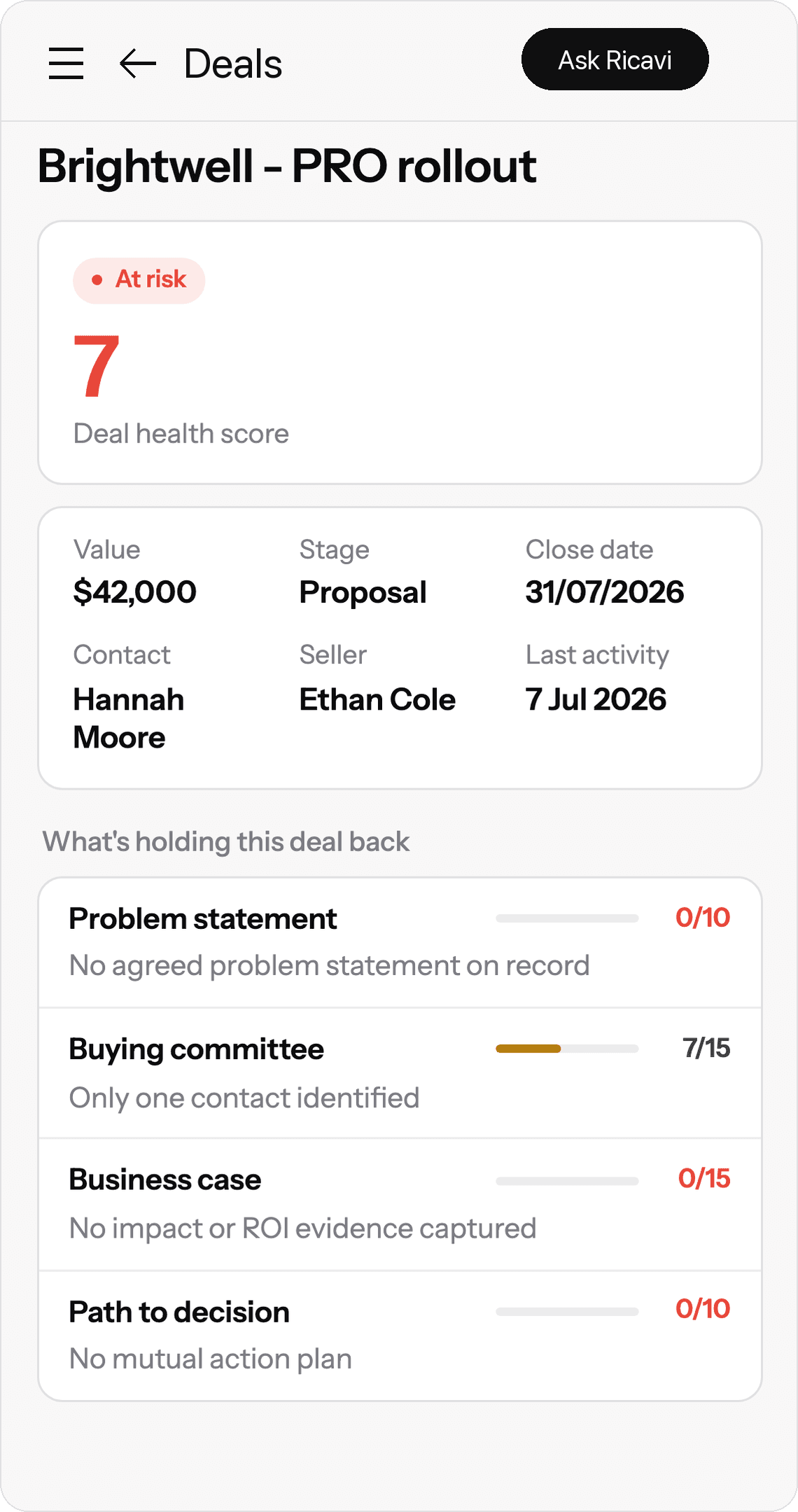
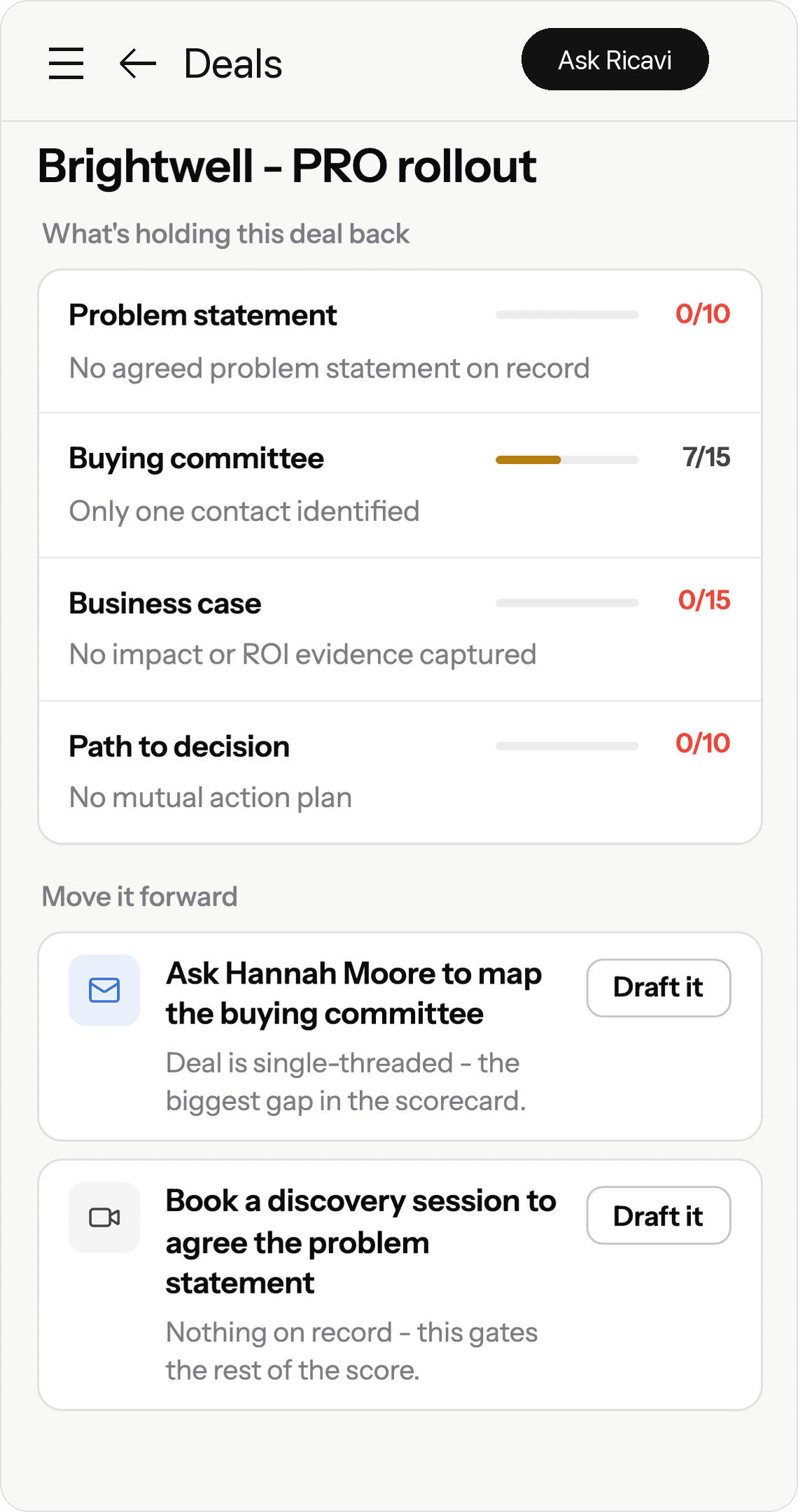
What the calls show about the Brightwell - PRO rollout deal ($42,000, at Proposal in the CRM, closing 31/07/2026): Ricavi marks it at risk. Problem statement: no agreed problem statement on record. Buying committee: only one contact identified, Hannah Moore. Business case: no impact or ROI evidence captured. Path to decision: no mutual action plan.
Your CRM says Proposal. The calls can disagree.
Deal scoring you can check, one area at a time.
A score only helps the review if you can see why. Each area shows what’s missing, and the move Ricavi drafts to fix it.

Why the score is low
Each area of the score shows why it’s low. It comes from what buyers said on calls and what’s in the CRM.
The problem
No problem statement is agreed on the calls or in the CRM yet. Until the buyer confirms the problem in their own words, that gap holds back the rest of the score.
Who’s buying
The buying committee is everyone on the buyer’s side who has a say. Only Hannah Moore is on the calls and in the CRM. So one contact keeps it low.
Next move
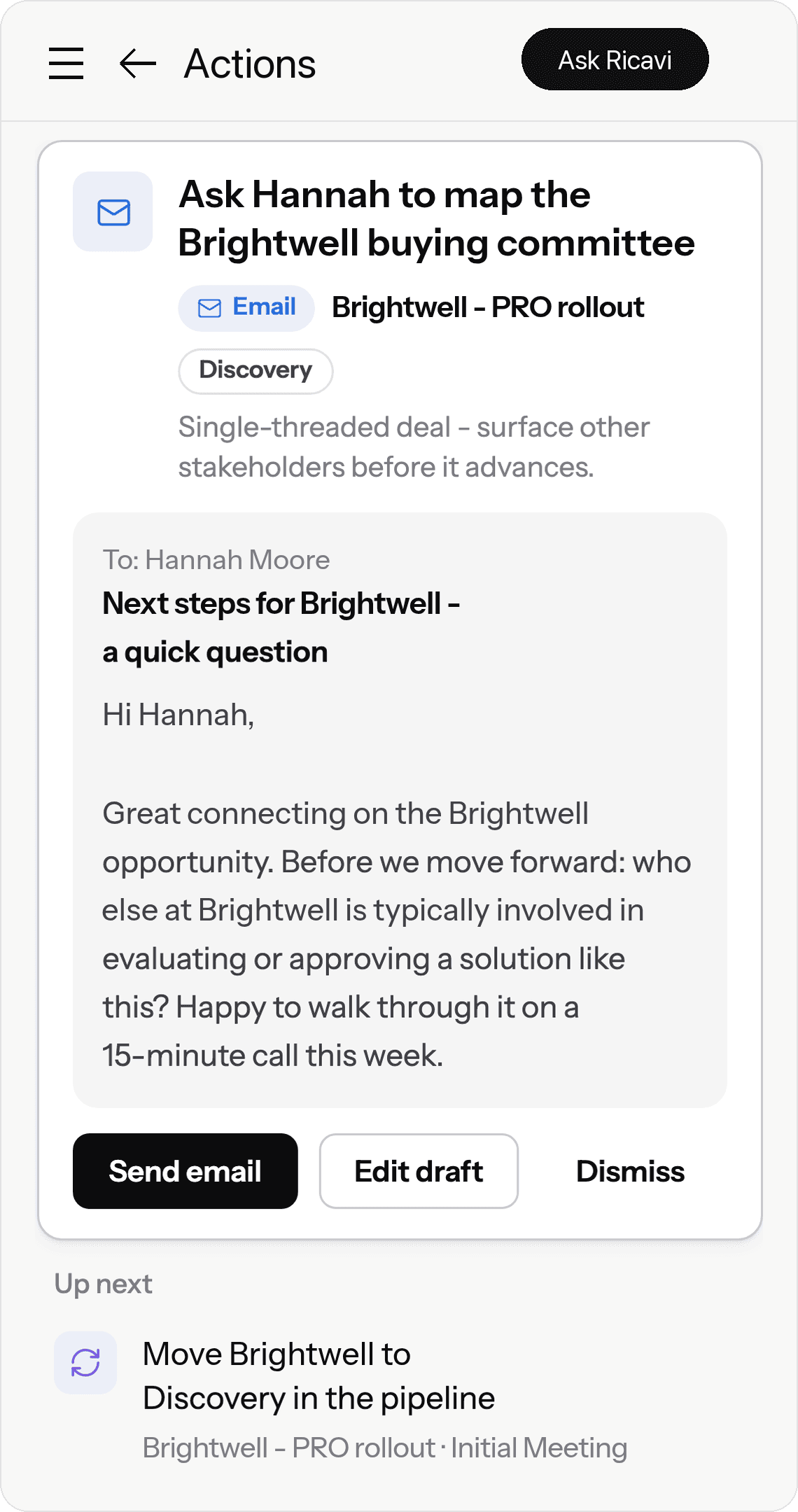
One press drafts the move for each gap. One email asks Hannah to map the buying committee. One request books a discovery session to agree the problem.
Drafted, and waiting for the rep.
Every score shows why. Then Ricavi drafts the fix.
Deal inspection that runs all week.
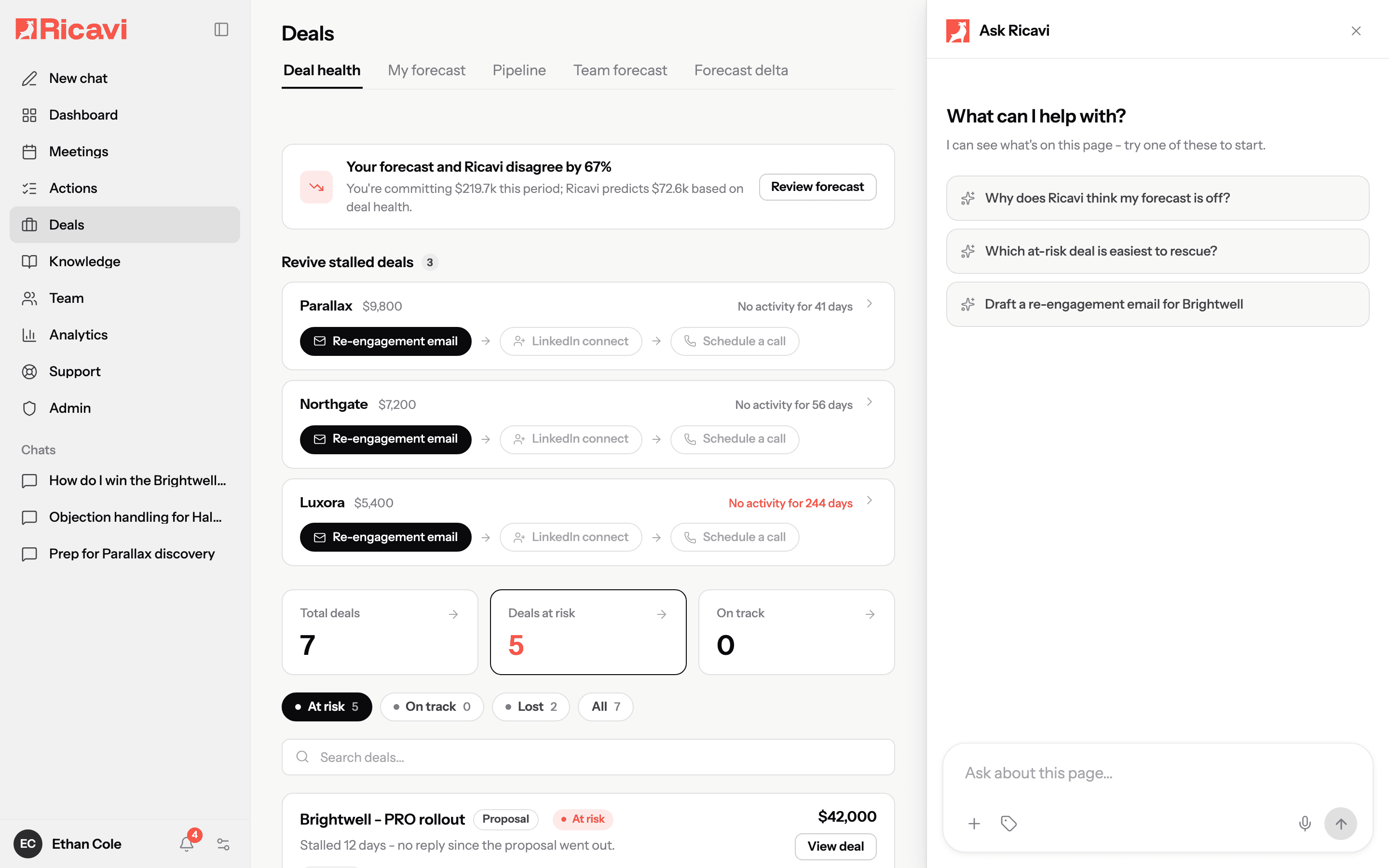
Ricavi checks each deal between your weekly reviews. When a deal goes quiet or slips, a warning shows on the deal that day.
Goes quiet
No reply, no meeting, no call. Ricavi counts every quiet day.
Warning that day
On Friday, Brightwell slips. The warning is on the deal that day.
Revival plan drafted
When a deal goes quiet, Ricavi drafts a revival plan for the rep. It holds a re-engagement email, a LinkedIn message (a draft only), and a call script.
Rep approves
The rep checks each draft first. Nothing goes out on its own.
Ricavi checks deals between reviews. Risky ones get flagged that day.
“
“We’ve significantly increased our pipeline and boosted our bottom line. I highly recommend Ricavi to any business owner looking to drive sales fast. The investment has paid for itself many times over.”

Costa Vasili
CEO, Ethnolink
Step by step
How to run a deal review on evidence.
A deal review is the meeting where a manager and a rep go through the rep’s deals. A review on evidence starts from what the buyer has agreed on record, not the stage. Open the at-risk deals first. Read what’s holding each one back, agree one next move, and approve the drafts.
- Before you meet
The CRM says Brightwell is at Proposal, closing 31 July.
Ricavi reads the calls and the CRM. It marks the deal at risk.
- Step 1
Open the at-risk deals first, not whoever talks first.
Each deal has a health score, from what buyers said on calls and what’s in your CRM.
- Step 2
Read what’s holding each deal back.
Each area shows what’s missing. Here: no agreed problem, one contact, no business case, and no plan.
- Step 3
Agree one next move per deal.
One press drafts the move that closes the biggest gap. For Brightwell, it’s an email asking Hannah to map the buying committee.
- Step 4
Approve the drafts before the meeting ends.
The email, the task, and the CRM update wait for the rep. Nothing is written to your CRM until someone approves it.
- Next call
Hannah joins the next call. The decision process is still open.
The live sidebar tells the rep what to ask next. “Who else is involved in signing this off, and what are the steps?”
See live coaching →
Last reviewed 20 Oct 2026 · Source: Ricavi product documentation
When the review is done
Each move you agreed waits as a draft.
This is the rep’s Actions page in Ricavi. The follow-up, the stage change, the task, and the CRM update wait here in one queue. The rep can edit, approve, or dismiss each one. Nothing is written to your CRM until someone approves it.
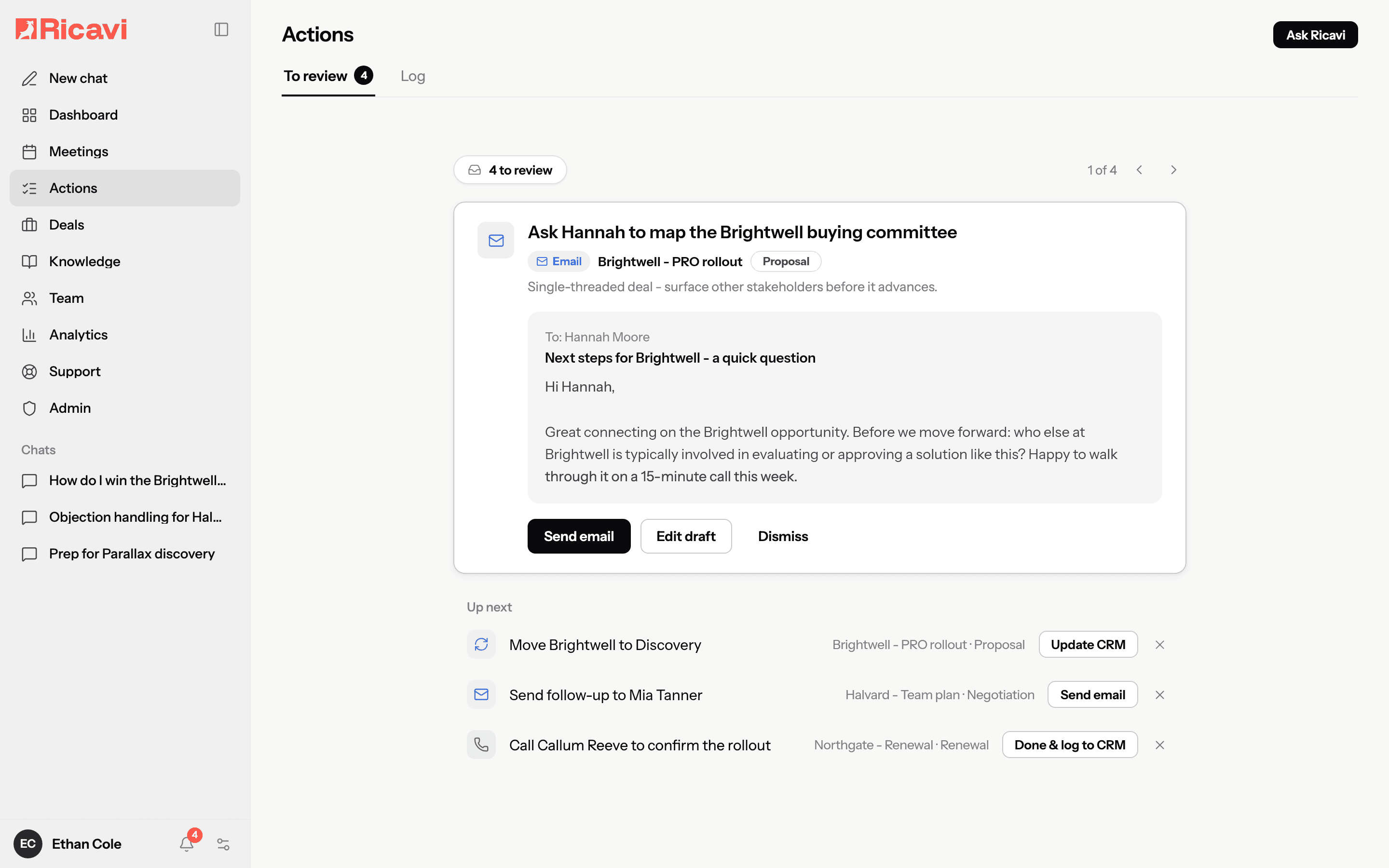
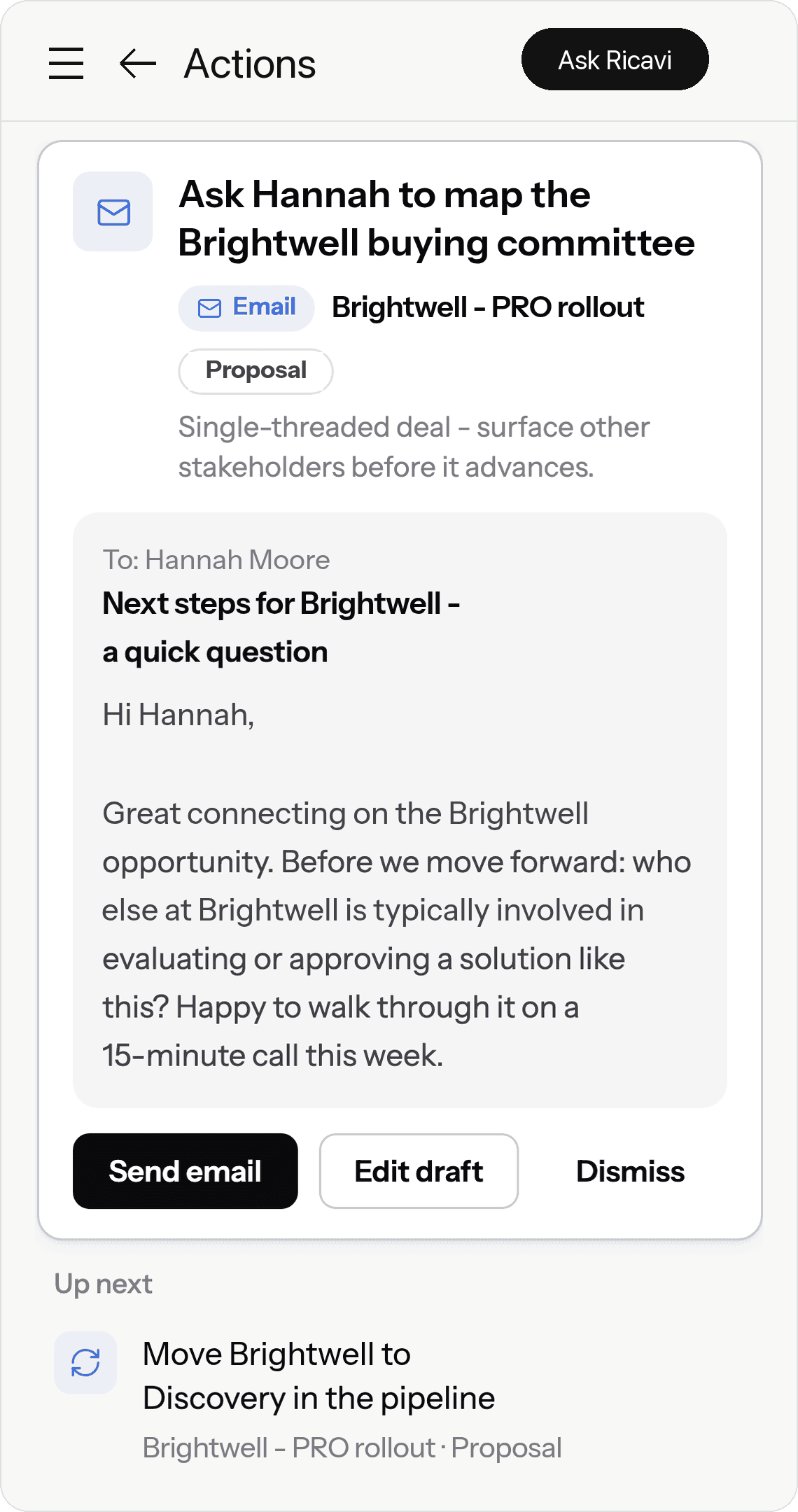
Every move you agree waits as a draft. The rep approves it first.
Sales call planning for the next meeting on the deal.
Pick what the call is for. You’ll see the questions to answer before anyone joins, and what a good answer sounds like. Copy them into the rep’s prep or your next deal review.
8 questions
What a good answer sounds like
A problem the buyer named on a call, with a cost or a result tied to it. If only the rep’s summary exists, discovery isn’t done.
Where Ricavi helps
The pre-call brief has past notes and an email summary. Prep starts from what was already said.
What a good answer sounds like
Names and roles beyond the first contact. One name means the deal is single-threaded.
Where Ricavi helps
Ricavi flags deals that rest on one contact. It drafts a note asking for an introduction.
What a good answer sounds like
Problems the buyer already agreed to, with the most important first. Everything else can wait for another call.
Where Ricavi helps
Set the call objective to Demo. The brief then suggests an agenda to match.
What a good answer sounds like
A line per attendee. The evaluator wants proof, and the budget owner wants the business case.
Where Ricavi helps
The brief lists who’s attending and what was said on earlier calls.
What a good answer sounds like
The problem, the business case, and the path to a decision, each confirmed by the buyer. Gaps here turn into concessions later.
Where Ricavi helps
The deal page shows which of these is still missing on record.
What a good answer sounds like
A named decision maker and a date. Without one, a price objection is usually a stall.
Where Ricavi helps
Ricavi’s pricing objection skill opens a chat with the deal’s CRM record loaded. Use it to draft the reply.
What a good answer sounds like
The problem they bought it for, and the result since, in words the buyer knows.
Where Ricavi helps
Ricavi has a skill for renewal and negotiation plans. It opens a chat with the account’s CRM record loaded.
What a good answer sounds like
The current decision maker and champion, by name. A new name means selling the value again.
Where Ricavi helps
Ricavi’s multi-threading plan skill helps the rep plan who to bring in next.
“
“I was at dinner and overheard my team telling our GM how valuable they found Ricavi.”

Jane Susak
Sales Manager, Essential Assessment
Brightwell has no mutual action plan yet. Ricavi drafts one.
Ricavi drafts a plan like this from the deal’s calls and CRM record. A mutual action plan is the steps the buyer and the rep agree to take, up to the signature. The rep edits it and agrees it with the buyer. Having a plan is also part of the deal health score.
For RevOps
The rules behind every score and draft are yours.
Your admin sets them once. Then managers and reps judge every deal by the same rules. Most rules apply to the whole company. Action types can be set per team or per seller.
When a deal counts as at risk, and how long a quiet deal waits before it’s stalled.
Set by your admin. The stalled default is fourteen days.
Which factors count towards deal health.
Set by your admin, for the whole company.
Which moves Ricavi may draft: emails, tasks, stage changes, and CRM updates.
Switched on or off per team or per seller.
Which fields Ricavi may write to.
An allow list or a block list, set by your admin.
When a draft reaches your CRM.
Always on. Nothing is written to your CRM until someone approves it.
The morning briefing’s timing and content for each team.
Set by your admin, or switched off.
Meet us before you buy. Watch, read, or join.

Revenue Leaders podcast
Hosted by Luigi, Regan, and Dave
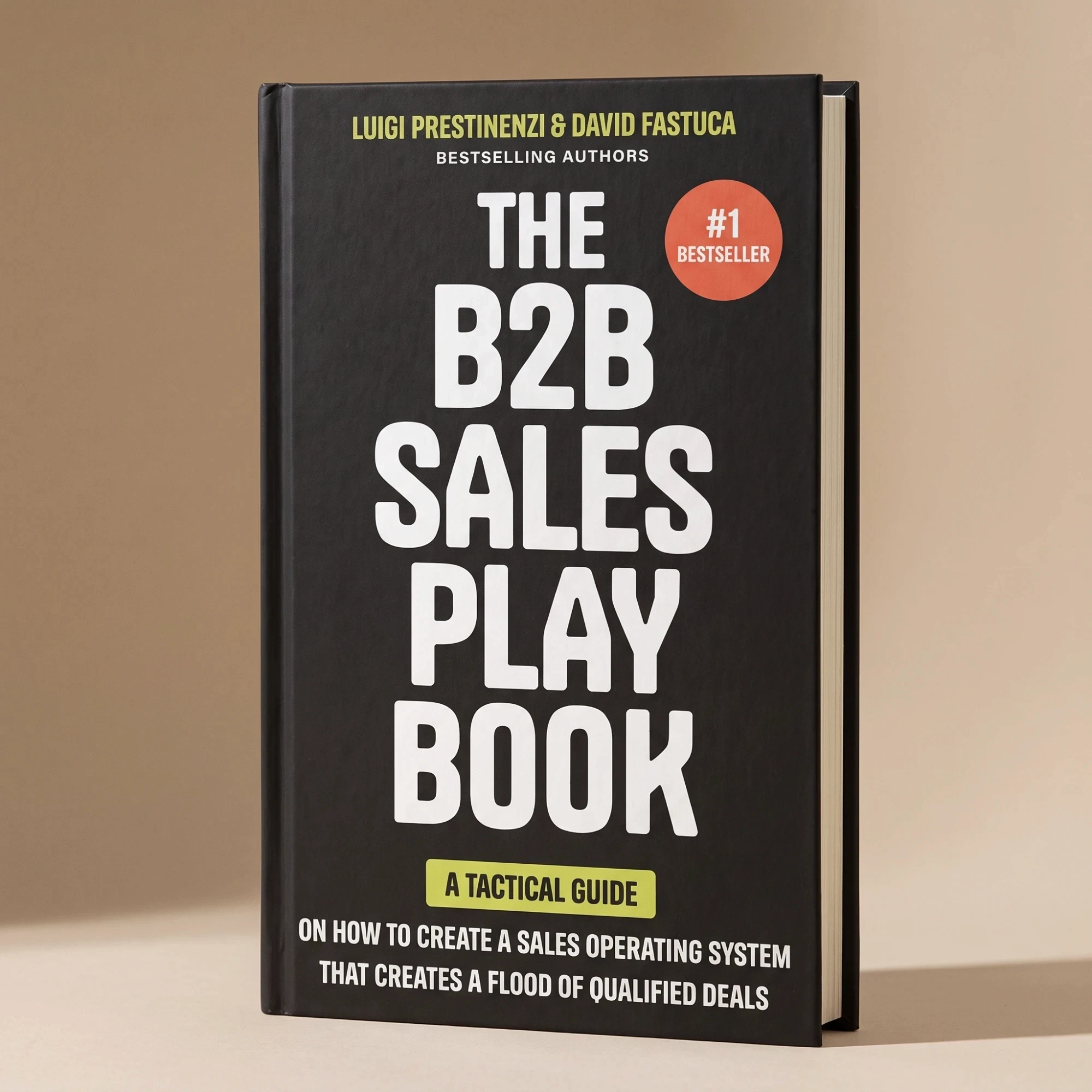
The B2B Sales Playbook
By Luigi and Dave

The live weekly session
Free, in Growth Forum
Under the bonnet
Built on how sales is taught, not bolted on.
Behind Ricavi are 20 years of the founders’ sales coaching and 5,000+ built-in skills.
The people behind it
Built by builders.
Dave builds companies. Regan builds sales teams. Luigi builds performance.
Built-in skills
5,000+
Each one is a play for one moment in a deal, like finding the gaps against your methodology or mapping the buying committee.
“I have been working with the team at Ricavi for the last two months and already achieved higher conversion rates and a faster sales cycle.”

Stuart Cook
MD, TWIYO
If you remember one thing
The five things on this page.
1
Know each deal’s gaps before the review.
2
Your CRM says Proposal. The calls can disagree.
3
Every score shows why. Then Ricavi drafts the fix.
4
Ricavi checks deals between reviews. Risky ones get flagged that day.
5
Every move you agree waits as a draft. The rep approves it first.
Deal review software reads each deal from the calls and the CRM. It shows what each deal is missing, so the review runs on evidence. Ricavi gives each deal a health score based on what buyers actually said. Then it drafts the next move for the rep to approve.
Deal review built on what buyers actually said.
Your reps tell you where each deal stands. Ricavi reads their calls and your CRM, and shows what each deal is missing. Walk out of every review with the next moves drafted.