HubSpot integration
HubSpot call recording with live sales coaching.
Ricavi records your sales calls on Google Meet, Microsoft Teams, and Zoom. It coaches each rep while the buyer talks. Then it drafts the HubSpot updates for the rep to approve.
HubSpot call recording with Ricavi: calls on Google Meet, Microsoft Teams, and Zoom feed Ricavi, which sits above your CRM and sends drafted updates once the rep approves them.
 Google Meet
 Microsoft Teams
 Zoom
 Google Calendar
 Outlook
So the pre-call brief lands 30 minutes before each call.

Ricavi sits above your CRM and guides the work at every stage.
- Price objection
- Decision process still open
- Scorecard, 62/100
Calendar
 Files
- Google Drive
- OneDrive
Connected at onboarding, with your calendar.
 HubSpot
 Salesforce
 Microsoft Dynamics
Records where your calls happen. Sits above your CRM.
The short answer
What is HubSpot call recording with Ricavi?
83%
Less admin
Ricavi writes the call notes, drafts the follow-ups, and updates the CRM once reps approve.
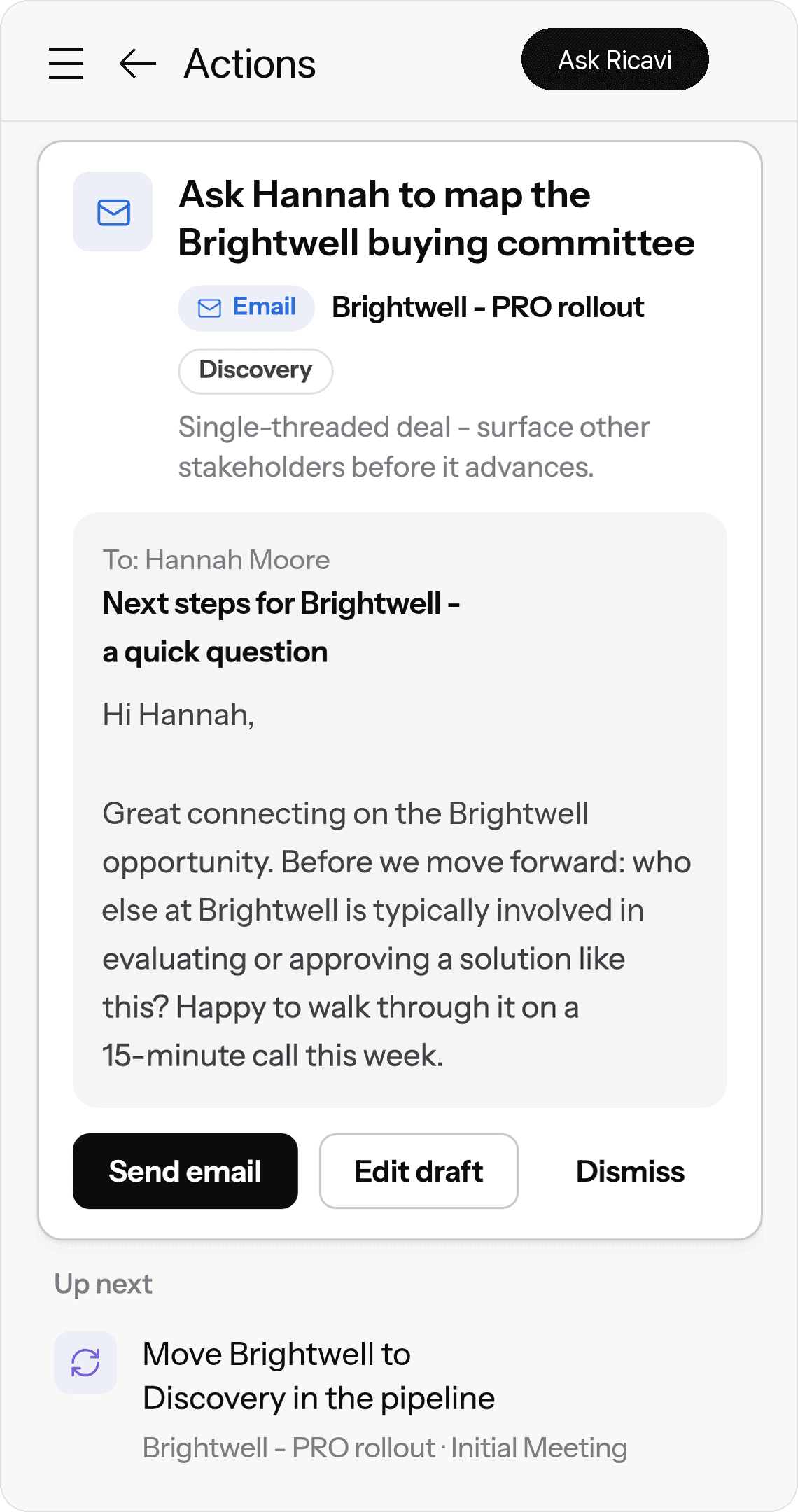
HubSpot call recording with Ricavi records your sales calls on Google Meet, Microsoft Teams, and Zoom, and coaches the rep live. After the call, Ricavi scores it and drafts the HubSpot updates: the call log, next steps, the stage change, and contact details. The rep edits and approves each one before it syncs.
Records
Google Meet, Microsoft Teams, and Zoom calls, through the Chrome extension.
Coaches
During the call, in a sidebar only the rep sees.
Drafts
The call log, next steps, stage change, and contact updates.
Syncs
Contacts, deals, and activities, once your admin connects HubSpot.
Approves
Nothing is written to HubSpot until the rep approves it.
Last reviewed 30 Oct 2026
One call into HubSpot
One call, from the recording to HubSpot.
Here’s one call, step by step. Nothing reaches HubSpot until the rep says yes.
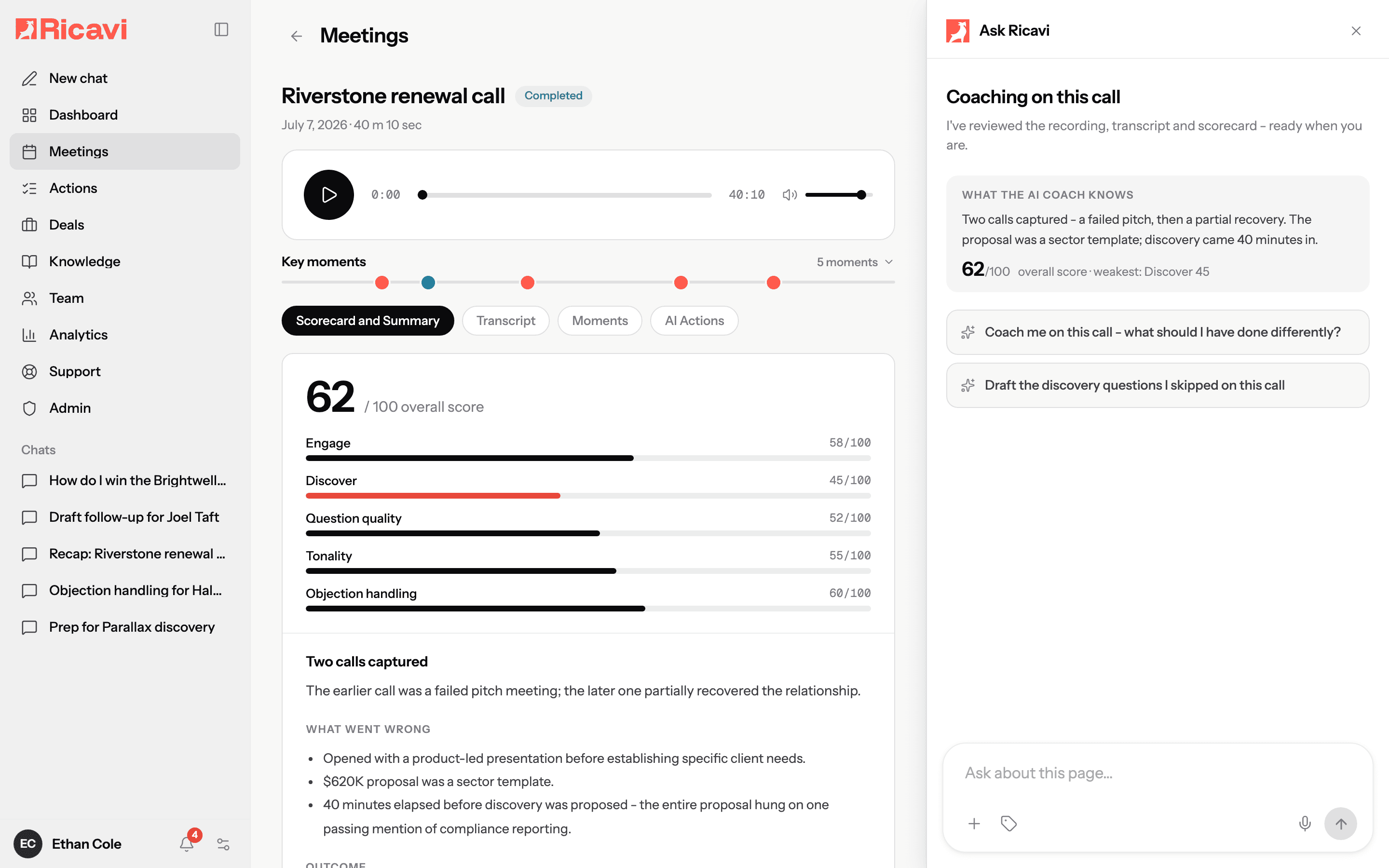

The call is recorded and scored.
Ricavi records the call on Google Meet, Microsoft Teams, or Zoom. When the rep hangs up, the notes and a scorecard are ready.

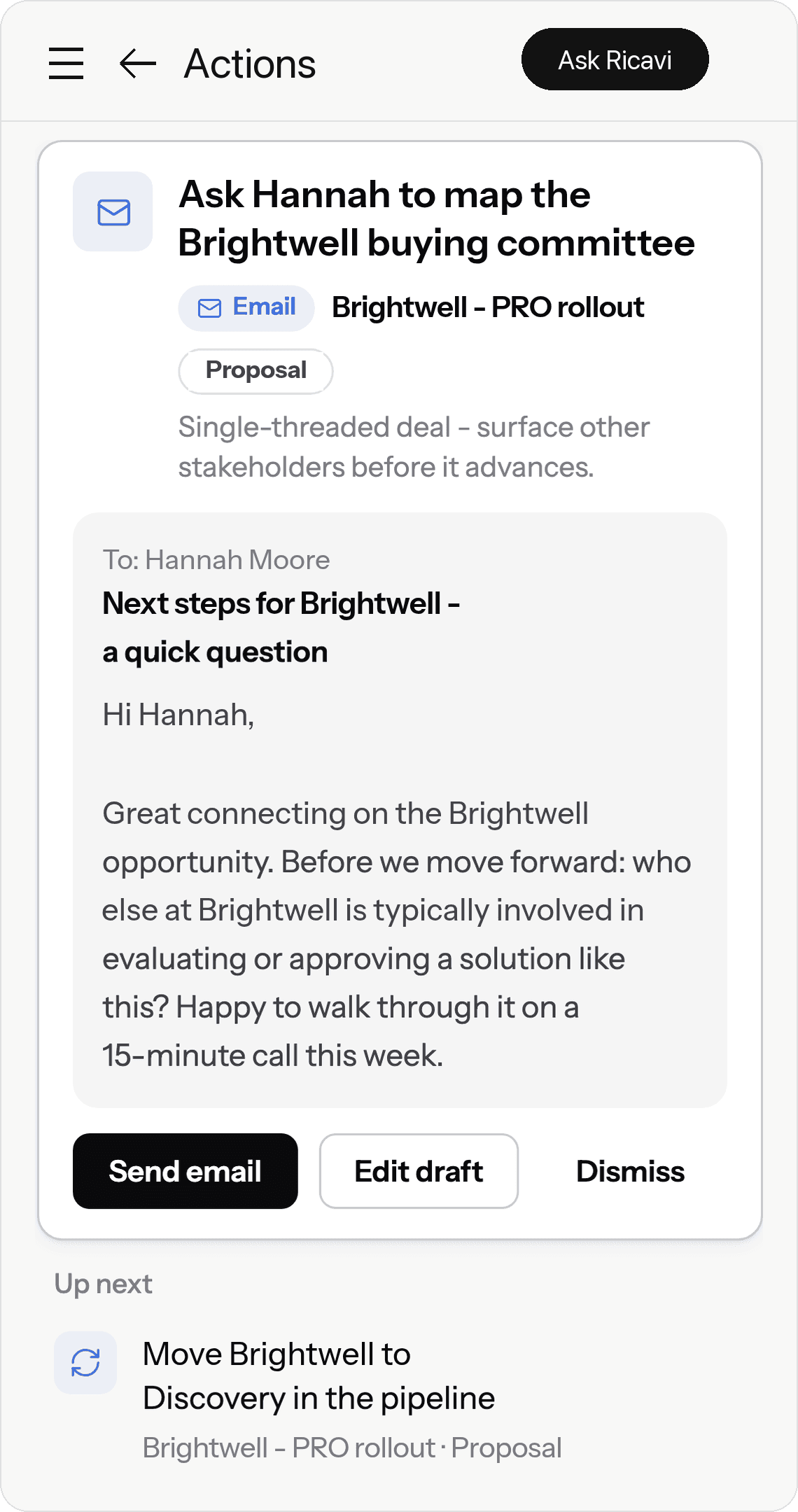
The HubSpot updates are drafted.
Ricavi drafts the follow-up, the stage change, and the call log. Here, it drafts a move back to Discovery. The buyer hasn’t agreed the problem yet.
The rep checks it and says yes.
The rep can edit, approve, or dismiss each draft. One press on Update CRM sends the stage change to HubSpot.
HubSpot is up to date.
The Brightwell deal shows its new stage in HubSpot. The next brief and the deal’s health score start from the same record.
✓
Synced to HubSpot
Deal
Brightwell - PRO rollout
Change
Stage moved to Discovery
Approved by
Ethan Cole
What Ricavi adds
HubSpot conversation intelligence, and what Ricavi adds.
Keep HubSpot for your phone calls and your records. Ricavi coaches your video calls and drafts the updates.
✓ Recorded, on the record’s timeline
✕ Not recorded. Keep HubSpot for these.
✓ With a Professional or Enterprise seat
✓ On each recorded video call, with key moments
After the call: review, comments, and playlists
✓ During the call, in a sidebar only the rep sees
Call stats, such as talk time and talk speed
✓ A scorecard on five skills and your sales method
An AI summary on the call
✓ A drafted call log, next steps, stage change, and contact updates, each approved by the rep
Peach tick: yes. Grey X: no.
HubSpot column: HubSpot Knowledge Base, “Review call recordings and transcripts” (updated 9 Oct 2026, read 30 Oct 2026). What you get depends on your HubSpot plan.
“
“The summary, follow-up email, and CRM notes are basically ready by the time I hang up, so it’s more of a quick review than half an hour of admin.”
Joey P.
Review on G2, 19 Oct 2026
Setup
How to connect HubSpot to Ricavi.
The HubSpot integration is set up once, by your admin. Onboarding sets up your methodology, playbooks, CRM, and recording rules with you.
1
Connect HubSpot.
A Company Admin opens CRM Config in Ricavi, picks HubSpot, and grants access in HubSpot.
2
Pick what syncs.
Choose the records Ricavi syncs: contacts, deals, and activities.
3
Map the deal fields.
Choose the deal fields Ricavi sends to HubSpot.
4
Match your people.
Link each HubSpot user to their Ricavi user. Each rep then sees the deals they can open in HubSpot.
You’ll need to be a Company Admin in Ricavi, with access to the HubSpot account you want to connect.
Read the HubSpot setup guide
Control
You decide what Ricavi may change in HubSpot.
Your admin sets the rules once. Nothing is written to HubSpot until someone approves it.
Your admin sets
✓
Which drafts Ricavi may make: emails, tasks, stage changes, and CRM updates.
✓
Which HubSpot fields Ricavi may change.
✓
Which deals each person sees, matched to their HubSpot access.
✓
Which calls are recorded: all, external only, or internal only.
Your rep decides
✓
Edits any draft first.
✓
Approves each update, one by one.
✓
Or dismisses it.
✓
Sends follow-ups from their own email account.
Meet us before you buy. Watch, read, or join.

Revenue Leaders podcast
Hosted by Luigi, Regan, and Dave

The B2B Sales Playbook
By Luigi and Dave

The live weekly session
Free, in Growth Forum
Under the bonnet
Built on how sales is taught, not bolted on.
Behind Ricavi are 20 years of the founders’ sales coaching and 5,000+ built-in skills.
The people behind it
Built by builders.
Dave builds companies. Regan builds sales teams. Luigi builds performance.
Built-in skills
5,000+
Each one is a play for one moment in a deal, like handling a price objection or mapping the buying committee.
“I have been working with the team at Ricavi for the last two months and already achieved higher conversion rates and a faster sales cycle.”

Stuart Cook
MD, TWIYO
FAQ
Questions HubSpot teams ask first.
HubSpot call recording keeps a recording of a sales call on the HubSpot record. HubSpot records the calls your reps place from its own calling tool. Ricavi records your video sales calls on Google Meet, Microsoft Teams, and Zoom. It coaches the rep live, then drafts the HubSpot updates for the rep to approve.
HubSpot call recording with live sales coaching.
Ricavi records your sales calls on Google Meet, Microsoft Teams, and Zoom. It coaches each rep while the buyer talks. Then it drafts the HubSpot updates for the rep to approve.
HubSpot call recording with Ricavi: calls on Google Meet, Microsoft Teams, and Zoom feed Ricavi, which sits above your CRM and sends drafted updates once the rep approves them.
- Google Meet
- Microsoft Teams
- Zoom
- Google Calendar
- Outlook
So the pre-call brief lands 30 minutes before each call.
Ricavi sits above your CRM and guides the work at every stage.
- Price objection
- Decision process still open
- Scorecard, 62/100
CalendarFiles- Google Drive
- OneDrive
Connected at onboarding, with your calendar.
- HubSpot
- Salesforce
- Microsoft Dynamics
Records where your calls happen. Sits above your CRM.